Give your AI a way to work your wholesale real estate pipeline
You have the list. Now someone has to clean it up, work through the properties and decide what deserves attention. LotLine Agent lets you hand that work to the AI you already use.
October 7, 2026 7 min readLotLine Editorial
LotLine Agent
You bring the leads. Your AI gets to work.
The instruction goes into your AI client. The work shows up in LotLine, ready for you to review.
Claude CodeLotLine connected
jacksonville / claude
> Work my 700-row CSV. Analyze the strongest 150, look up 40 owners, and give me the 15 to review first.
lotline - import_records
lotline - run_batch_autopilot
lotline - get_batch_status
Batch complete. Found 36 of 40 owners; four misses weren't charged.
lotline - list_review_queue
The 15 to work first, by score:
3262 Brackenmere St 91
4040 Pelican Quay Dr 88
4429 Marshcroft Ln 86
...and 12 more. Seller drafts are waiting in LotLine. Nothing was sent.
>
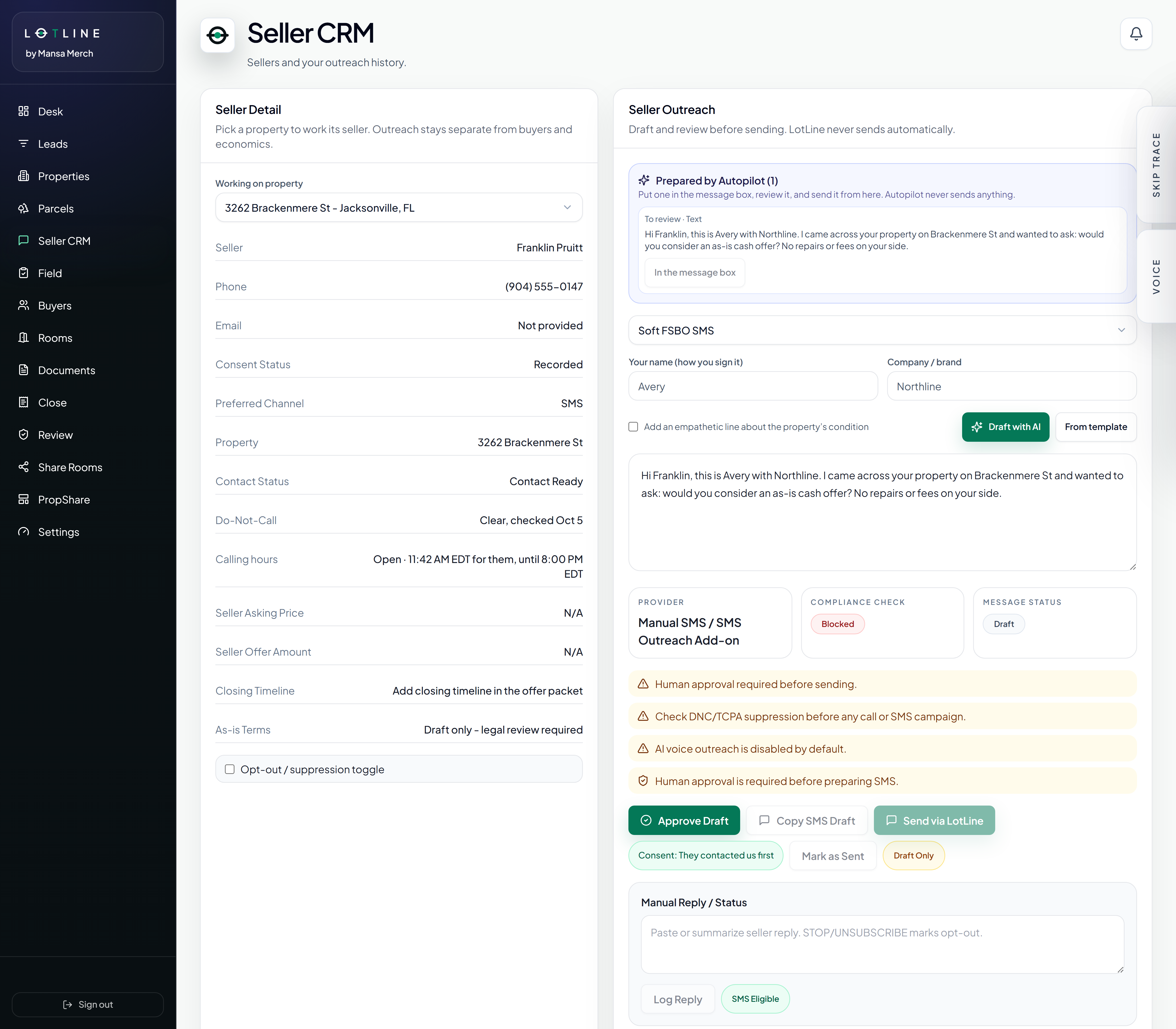
Inside LTLINESeller CRM
Ready for your review. Nothing was sent.
01Your list
02Agent coordinates
03LotLine does the work
04You review
Illustrative conversation and original LotLine demo capture. Fictional properties; elapsed batch time condensed. Example information is not a property claim, appraisal, bid, or guaranteed result.
From your list to your next move
A useful request sounds like something you would hand to a teammate: work this list, stay within this budget, and bring me the properties worth a closer look.
A list to work. A property to understand. A draft waiting for your review. These examples follow the client treatments in our launch films.
01
Find the place to start
9:41
Claude
Which of my new leads should I look at first?
These three scored highest in the Harlow County import:
4598 Ashlar St86
2759 Briar Fen Rd78
3985 Pinnock Ave69
What puts Ashlar St on top?
Its distress score is 78. The owner lives elsewhere, and the county lists an open code violation.
Reply to Claude...
Lead scores + property context
Ask a follow-up about the actual property. The conversation stays connected to the records in your workspace.
02
Work through the list
acquisitions / codex
CodexLotLine connected
> Work the 150 properties I selected. Run Batch Deal Autopilot and tell me which ones need attention.
Called lotline.run_batch_autopilot
Called lotline.get_batch_status
{ "completed": 148, "needs_attention": 2 }
148 finished. Two need another look before I can call this done.
I'll inspect those two results before retrying.
>
Batch analysis + job status
The agent can start a batch and check its progress. Long-running work stays visible, including the records that failed.
03
Be selective with lookups
Hermes Agent
Look at the scores first. Use owner lookup on the strongest 40, and stop if I reach my allowance.
HERMES AGENT
Found 36 of the 40 owners. The four lookups that found no one were not charged. The results are saved with the leads.
40Lookups
36Found
4No charge
mcp_lotline_list_leads
mcp_lotline_lookup_owner
Message Hermes...
LotLine connectedExample conversation
Prioritization + metered owner lookup
Choose where to spend your lookup allowance. Connecting an agent does not change the amount included in your plan.
04
Get a second look at a deal
ChatGPT
Walk me through the ARV and rehab estimate for Brackenmere St. What should I verify before making an offer?
Start with the roof and interior condition. The current estimate is based on limited evidence. I would review those assumptions alongside the comps before applying the numbers.
Roof condition
Interior evidence
Comparable sales
Ask anything
LotLine connectedExample conversation
Property analysis + review
Use the conversation to understand the work already in LotLine. Your comps, inspection and offer decision still need your judgment.
05
Catch up away from your desk
9:41
OpenClaw
bot · Telegram
What seller drafts are waiting for me in LotLine?
22 drafts are ready to review. Want to see the one for Marisol?
Yes, show me hers.
The draft is waiting in Seller CRM with the property and contact details. Nothing has been sent.
Message
Review queue + seller drafts
With a configured OpenClaw connection, a message in Telegram can bring you back up to speed before you return to the workspace.
5 examples
Illustrative examples · Client appearance and availability vary.
The part between getting a list and working a deal
A CSV with 700 properties can be a good starting point. It can also be several evenings of cleanup, scoring, lookups and checking which jobs finished. The work is necessary, but much of it is coordination.
LotLine Agent gives a compatible AI client tools inside your LotLine workspace. You describe the outcome. The client can read leads, start supported jobs, check results and prepare the next step against the same property records you use in the app.
For example: import the list, pick the 150 most promising properties for Batch Deal Autopilot, look up the strongest 40 owners, then bring back 15 to review. That is the sequence shown in the example above. It is a sample workload, not an included monthly allowance or a promise that the batch finishes instantly.
How the connection works
MCP stands for Model Context Protocol. In practice, it lets your AI client ask LotLine to do a supported task and read the result. You connect the client to your workspace, then give it instructions in the conversation.
The connection documentation covers Claude, Claude Code, ChatGPT, Codex, Hermes Agent and OpenClaw. Other compatible clients, including Cursor and Windsurf, may also work. The available connection method depends on the client, its authentication support and your account plan.
The AI chooses from the tools LotLine makes available. LotLine checks access and usage limits on the server. The connection does not give an AI unrestricted control of your browser, other customers' data or every action in the app.
Give it the same brief you would give a teammate
A useful instruction names the list, the result you want and the limits. "Work these 150 properties, look up at most 40 owners, and show me why you picked the top 15" is easier to evaluate than "find me good deals."
Say what matters in your market. You might prioritize recent open code cases, owners with out-of-state mailing addresses, or properties that meet your buy box. Ask the agent to explain its shortlist and separate missing evidence from completed work.
Large batches run as jobs. The agent can check their status and identify records that need attention. A request to prepare tomorrow's queue is a task in that conversation; it does not create a daily schedule by itself.
The draft is waiting for you
Seller outreach is a good example of the handoff. The agent can prepare a draft against a lead, and you can review it in Seller CRM with the seller details and the applicable outreach checks.
A prepared draft has not been sent. Agent does not automatically send seller texts, emails or place calls. Review the recipient, the wording and the permission to contact them before using a communication channel.
The same care applies to deal analysis. An ARV or rehab estimate gives you something to investigate. It does not replace current comps, an inspection or the decision about what you are willing to offer.
What the $49 monthly add-on covers
LotLine Agent is a $49/month add-on for eligible paid Growth Cloud and Team Cloud workspaces. It adds the connection that lets your AI coordinate supported LotLine work. An external AI subscription, when required by that client, is separate.
Owner lookups and other metered actions still use the relevant workspace allowances. Agent does not add a second pool of SMS, voice or lookup credits. You can tell it to work selectively, and server-side limits still apply.
The practical question is how much time you spend moving between steps. If you regularly work batches, check jobs and assemble a shortlist for an acquisition operator, that coordination can be worth delegating. If you only handle a few leads a month, the normal workspace may be all you need.
CSV imports, property analysis, seller drafts and the rest of the normal workspace remain available according to your plan. You do not need Agent to click through those workflows yourself.
An operator or VA can use the same property records after the agent has worked a list. The useful handoff is a clear shortlist, the reasons behind it, and the exceptions that need a person. You should not have to reconstruct the job from a wall of chat.
LotLine Leads is the separate product for building a batch from supported public records. You choose the market and criteria; Leads checks the sources, resolves properties and owners, and preserves the evidence behind the result.
You can use Leads through the web workspace where it is enabled without buying Agent. With both products, a connected AI can help coordinate the supported build and then work the resulting leads. Lead credits and workspace allowances remain separate.
The distinction is simple: Leads builds the pipeline. Agent works the pipeline.
Frequently asked questions
What is an AI agent for wholesale real estate?
It is an AI client that can use connected tools to carry out supported steps in a real estate workflow. With LotLine Agent, those steps include reading leads, starting analysis, checking jobs and preparing drafts in your workspace.
Which AI clients can connect to LotLine?
The connection documentation covers Claude, Claude Code, ChatGPT, Codex, Hermes Agent and OpenClaw, as well as compatible HTTP MCP clients. Client plan, transport and authentication requirements vary.
How much does LotLine Agent cost?
The add-on is $49/month for eligible paid Growth Cloud and Team Cloud workspaces. Any required external AI subscription is separate, and normal workspace usage limits still apply.
Does Agent send messages or make calls for me?
No. It can prepare seller outreach for review. It does not automatically send seller texts, emails or place calls.
Can it work an entire CSV?
It can coordinate supported imports and batch jobs. Your request must fit workspace permissions, batch rules and available allowances. Large jobs take time and may return records that need attention.
Do I lose manual features if I do not buy Agent?
No. The normal workspace remains available according to your plan. Agent adds another way to coordinate supported work.
Do I need Agent to use LotLine Leads?
No. Leads can be used in the web workspace where enabled. Agent is optional for coordinating supported Leads workflows through a connected AI client.
Can this replace my acquisition operator?
It can take on some of the software coordination. A person still needs to assess the property, verify assumptions, handle relationships and make consequential deal decisions.
Sources and further reading
Product details reviewed October 6, 2026. Check your workspace for current access and allowances.
 Codex
Codex Hermes Agent
 ChatGPT
 OpenClaw